
Application Portfolio Management (APM)
What is APM?
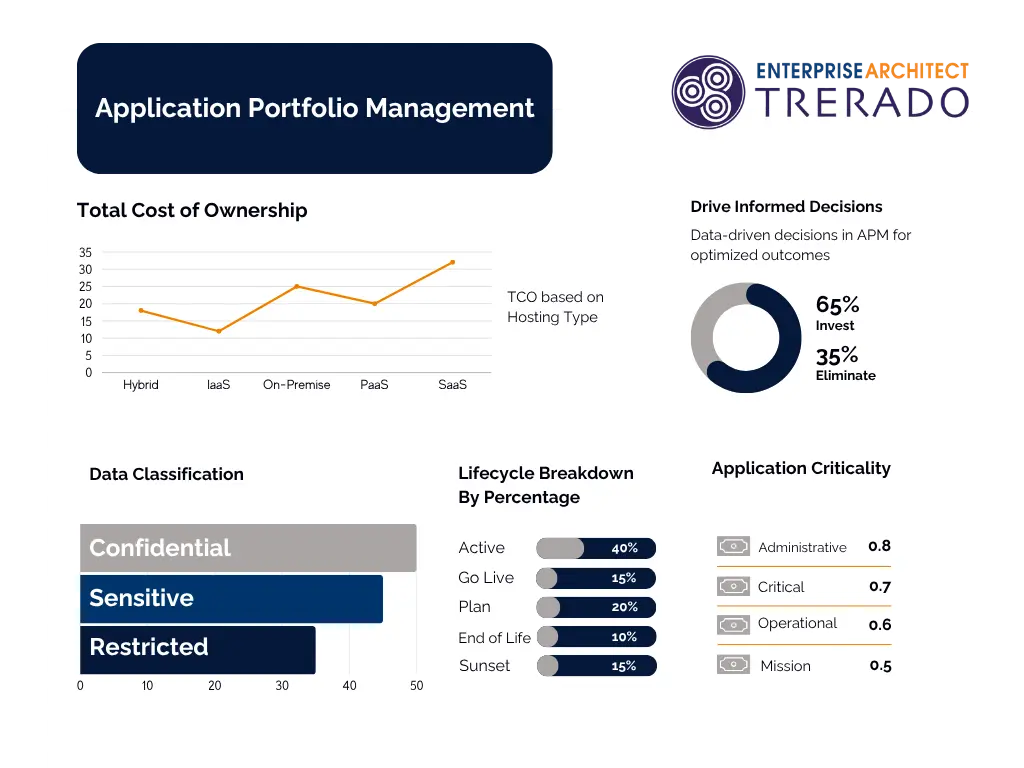
Application Portfolio Management (APM) provides a comprehensive overview of the business applications within an enterprise environment, enabling better application rationalisation. A centralised and managed application inventory, which provides clarity on the responsible parties, associated operating costs, technological obsolescence, lifecycle, data classification, security risks and other key characteristics, delivers real-time insights to stakeholders on cost control, risk mitigation and strategic alignment to drive critical business decisions.
APM tools serve as a central platform for the application inventory and support long-term planning, risk analysis, the identification of optimisation potential, and the enhancement of business value. They create transparency regarding the application portfolio and enable a regularly and automatically updated inventory, including mapping to business processes and business capabilities. Enterprise application leaders should manage their portfolio in the same way as a financial portfolio to optimise investments and ROI. When selecting an APM tool, use cases, objectives, business outcomes and technical requirements are crucial. In addition, vendor strategy, integration capabilities, user-friendliness and potential for consolidation, modernisation and strategic decision-making should be evaluated.
The APM configuration is an integral part of the Prolaborate offering and provides a ready-to-use introduction to Application Portfolio Management. Thanks to pre-configured dashboards, pre-defined attributes and an integrated Excel connection, organisations can begin analysing and managing their application portfolio immediately, without the need for complex implementation projects or additional development work. The high level of pre-configuration significantly reduces implementation effort and project risks, enabling teams to become productive more quickly and realise initial benefits in a timely manner. At the same time, the solution is highly customisable and can be easily adapted to individual requirements, processes and governance guidelines as needed – ranging from the use of the standard configuration to a bespoke APM solution.
Common Business Queries Related to APM
What applications exist?
Who owns these applications?
Who else uses these application?
Which Applications to Tolerate, Invest, Migrate, Eliminate (TIME)?
Which applications are at high risk of cyberattack?
What is the Data Classification of an Application?
What percentage of Applications are to be eliminated in the next timeframe?
Which Applications should we migrate to cloud environments?
What is the cost of applications in a particular domain or sub-domain?
Tool Usecase for APM
Application Master
The ability to maintain a master catalogue of business applications within Sparx Platform. The catalogue will serve as the source of application data.
Application must be grouped by Domains and serve Business Capabilities
The ability to maintain a relationship between an application, and an application domain hierarchy, in order to present the capabilities fulfilled by the Application
Application must have associated Application Services (Micro Services)
Application can provide or consume Application Services to accomplish Functions.
Application has Owner and Application has User Department
- The ability to maintain application ownership and usage information
- Department data will be maintained as part of an organizational hierarchy.
Application has Deployment Lifecycle End Date & Outlook
The ability to maintain a Lifecycle, outlook for each business application.
Application Portfolio Management (APM) – Features
Get started with Application Portfolio Management solution with a comprehensive accelerator package that enables users to embark on their journey. Seamlessly dive into managing your application landscape using The Essential Architecture (TEA) Toolkit built based on industry best practices and insights requested by CXOs worldwide.
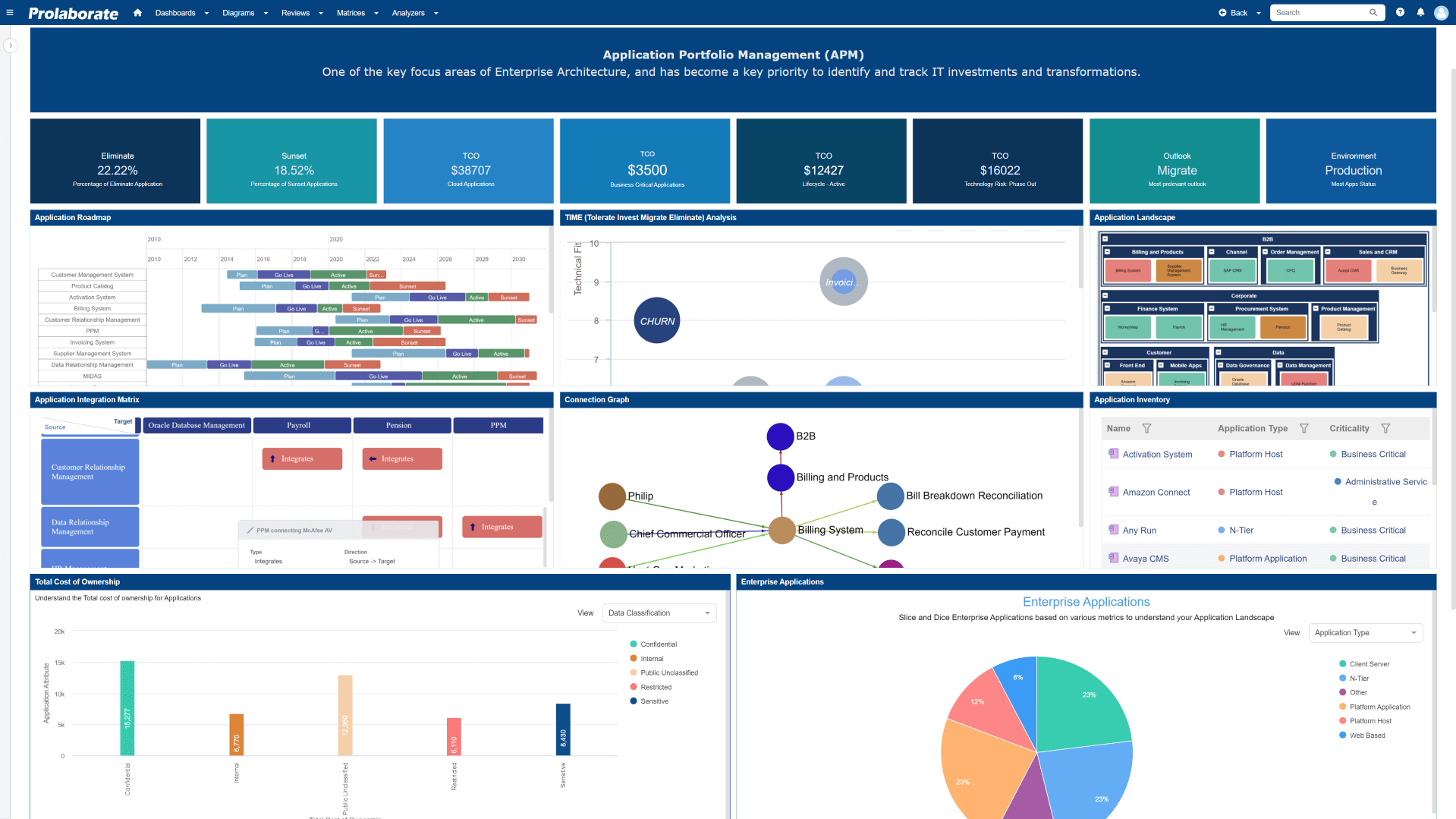
Sparx Architecture Platform features to drive your APM usecases
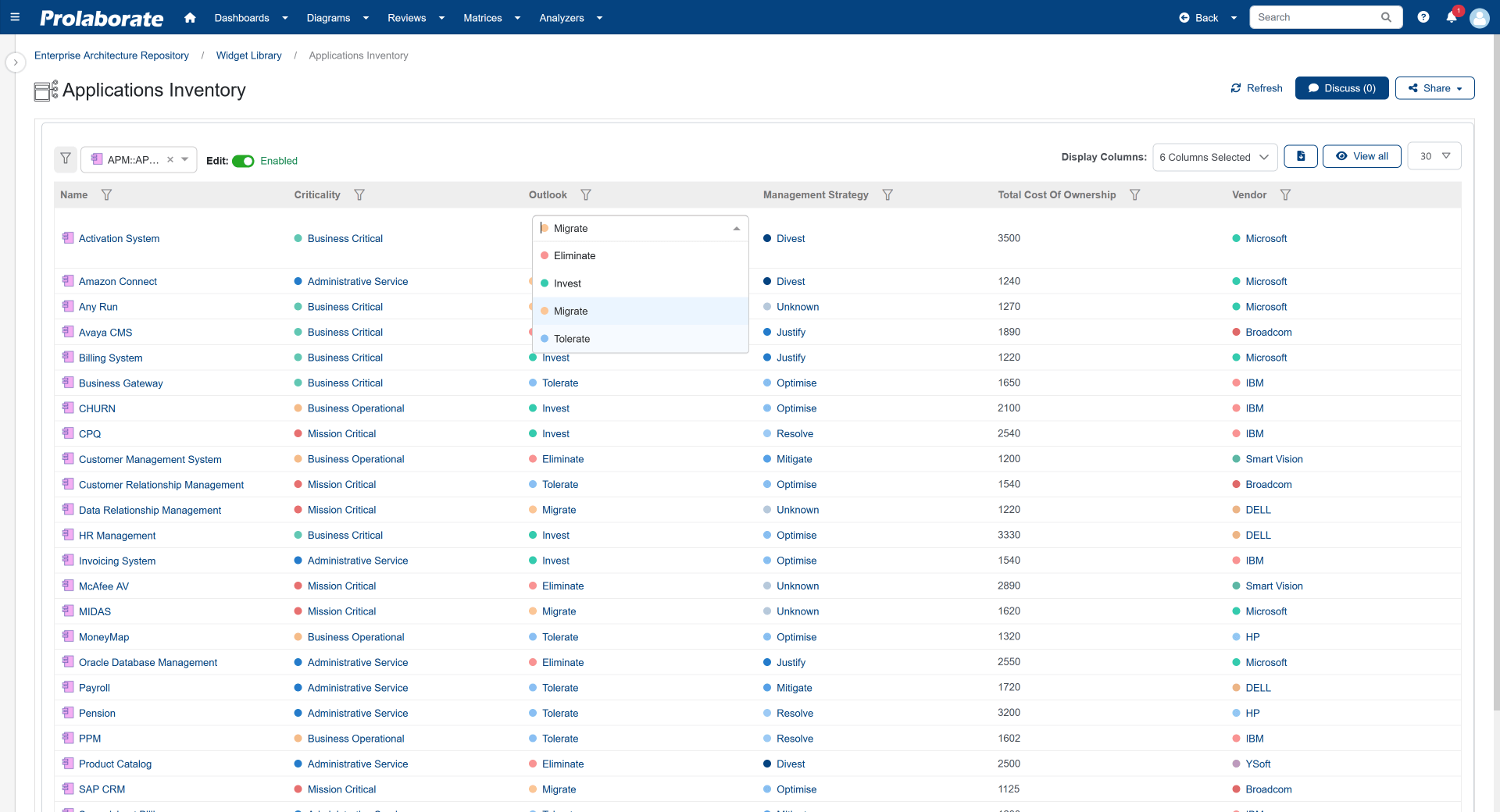
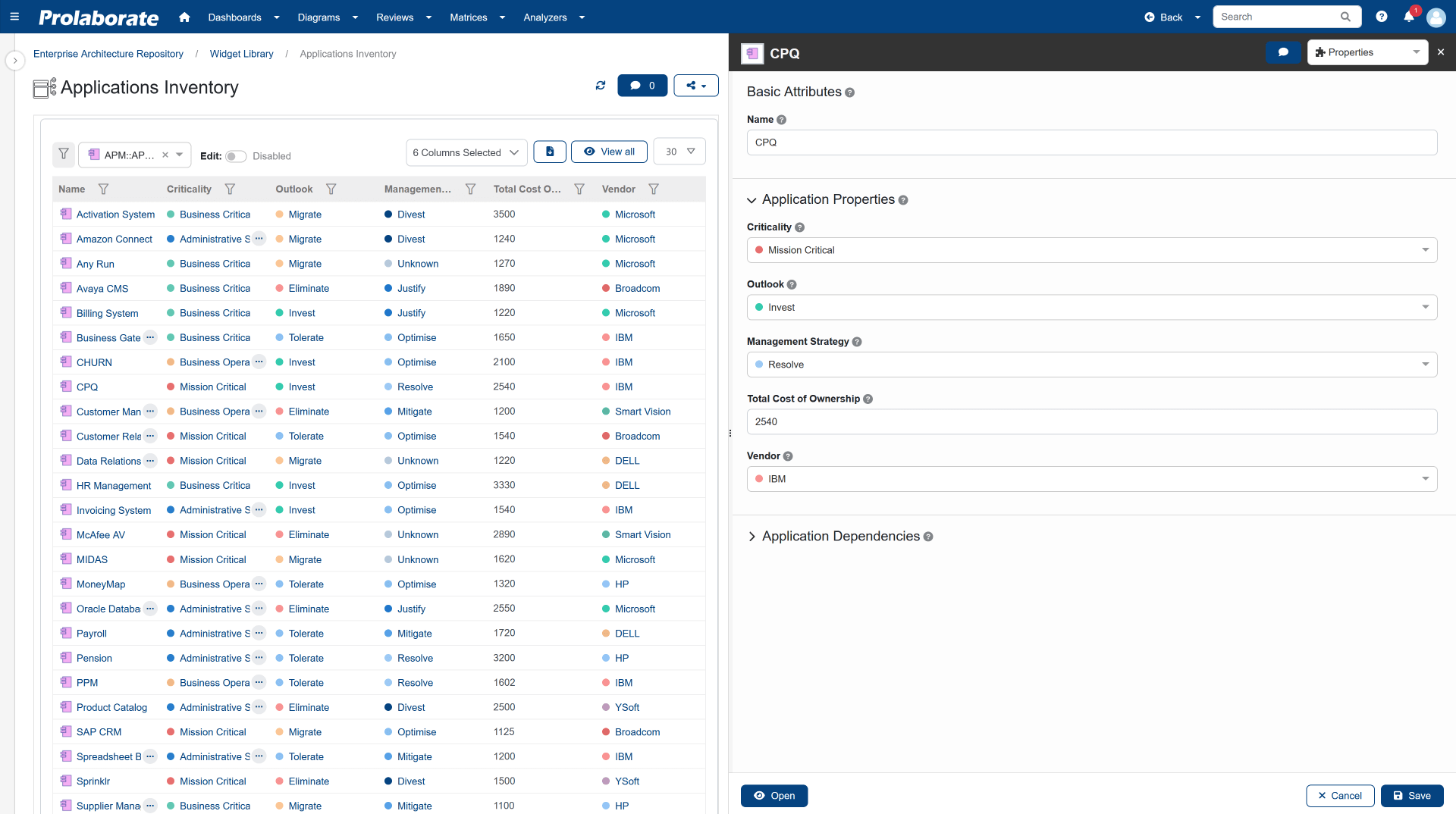
Catalogue your application inventory
- Get started by importing existing application, domain, owner, project and services information from Excel or connect to your external systems using the RESTful API.
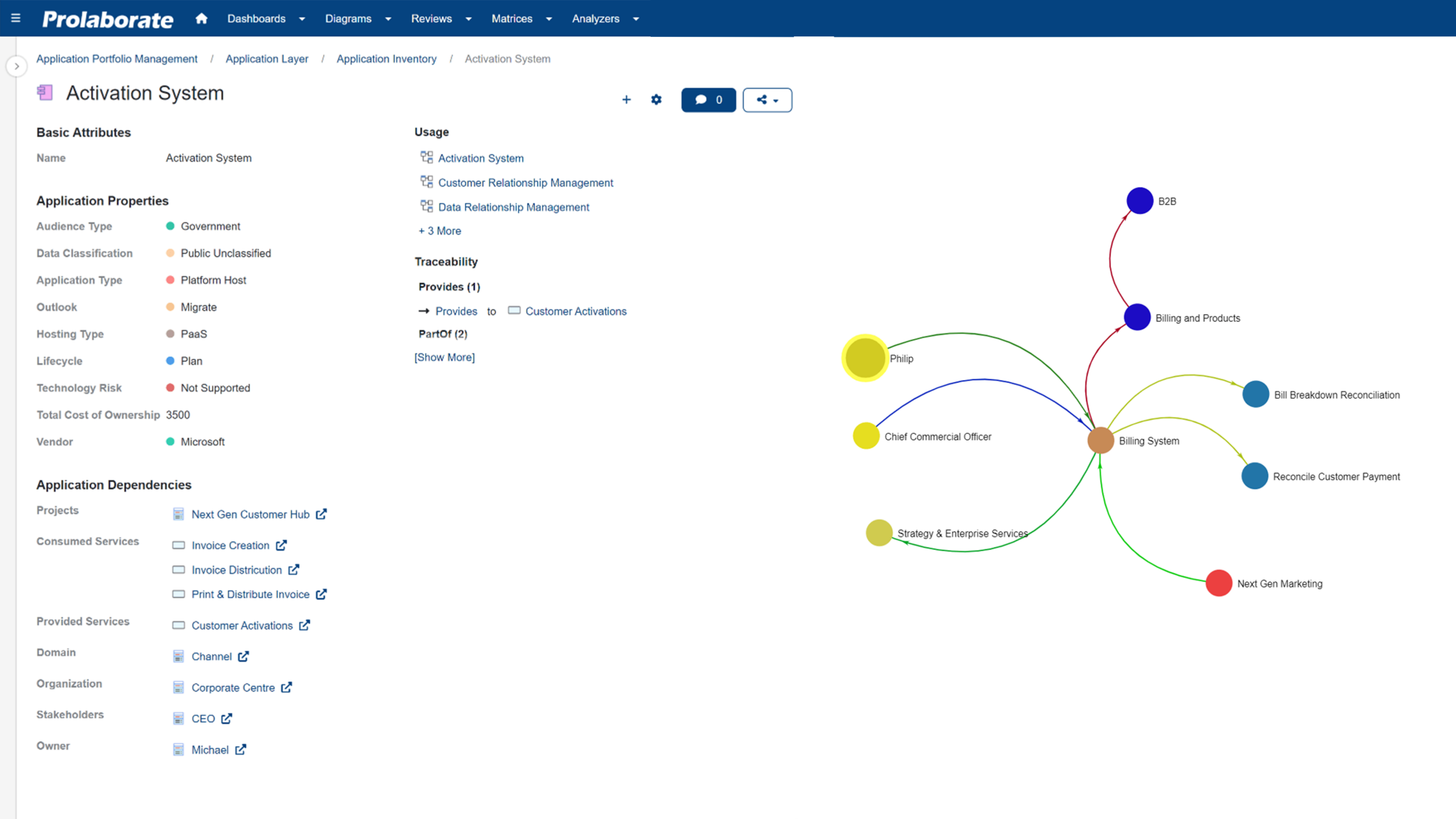
- View a transparent list of Applications and all its key attributes and interdependencies.
- Filter, slice and dice to find the applications of your interest and analyse in detail.
- Role specific views to have a focussed interface to view and update Application information.
- Analyse and map Application dependencies to domain hierarchy, stakeholders, owners, organisations and other key architectural constructs.
Enable insightful analysis of applications
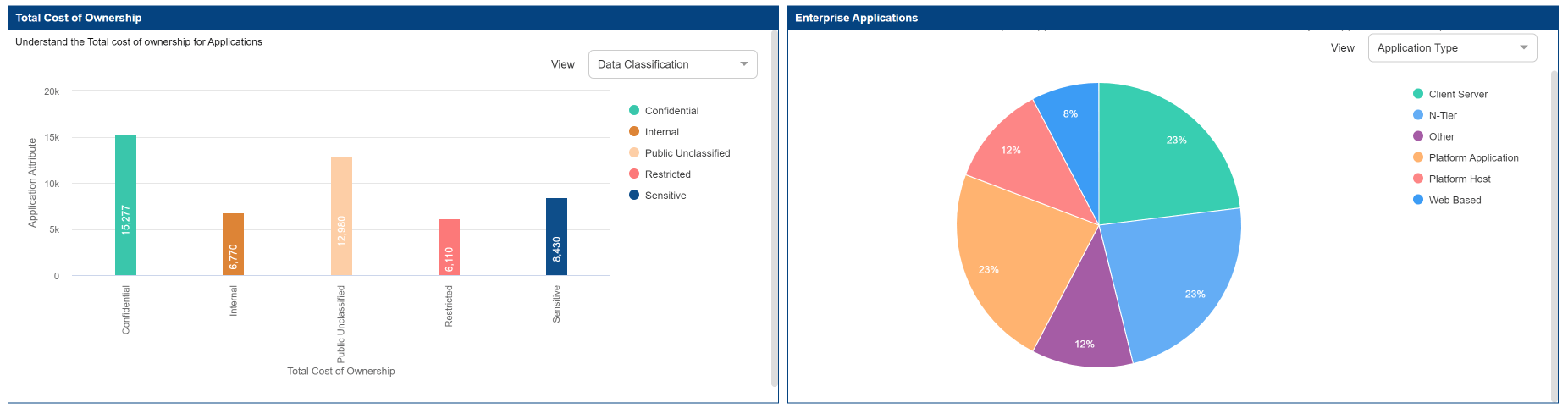
- Comprehensive Analysis tools to answer key Business queries.
- Ascertain the Total Cost of Operations of Applications in various lenses to track the effectiveness of your IT investments.
- Drive assessments based on various application attributes to determine the fit and outlook for the Application in the rationalisation exercise.
- Show how your applications support and enable the business by linking them to the functional domains and sub-domains that drives business functions.
- Link applications to the micro-services that it consumes or the in-flight projects that will impact the application in the transformation program.
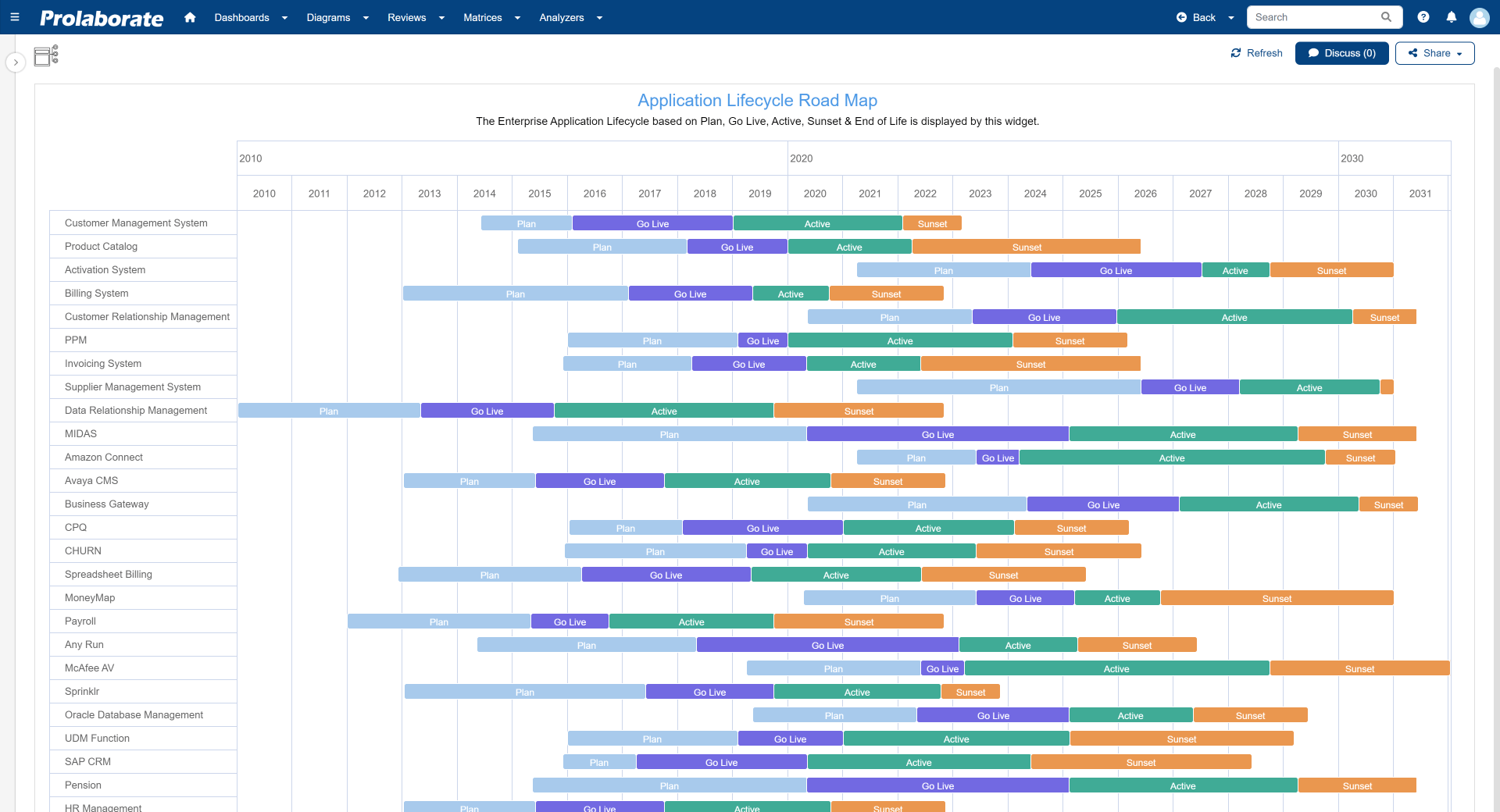
Advanced Roadmapping
Design tailored rationalisation viewpoints
Configurable dashboards to design the most appropriate rationalisation viewpoints to cater to specific stakeholder expectations.
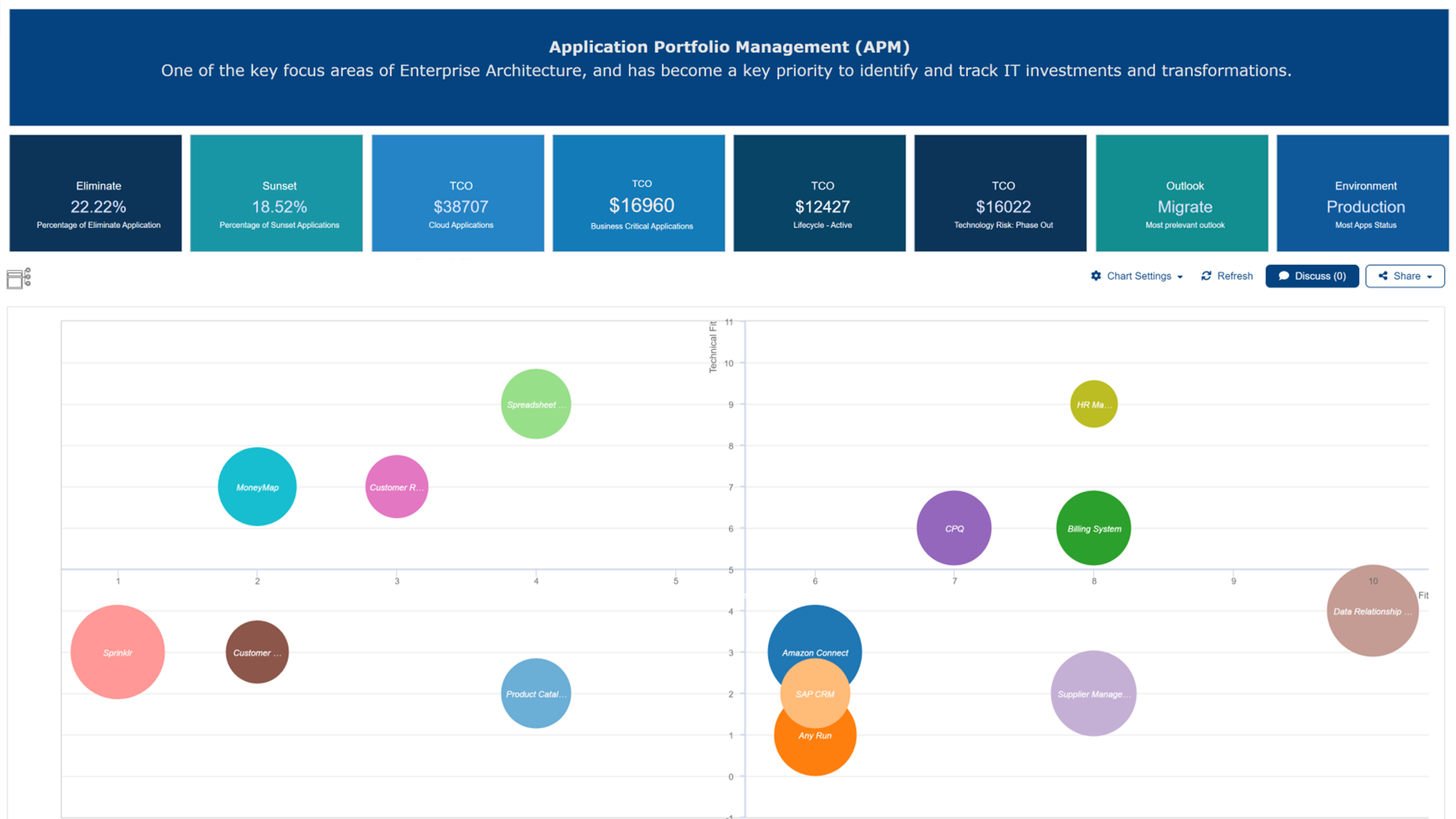
- Use TIME categorisation to prioritise opportunities for portfolio improvement using business and technology fitness, risk and cost.
- Use the domain hierarchy map to identify functional capabilities alignment with applications, and identify risks, redundancies and threats.
- Get an overview of data flows and dependencies between applications through provided and consumed interfaces.
- Identify candidates for rationalisation with pre-defined reports helping analyse the costs and value of each application.
- Apply the Gartner TIME methodology (Tolerate, Invest, Migrate, Eliminate) to categorise your portfolio and find rationalisation candidates.
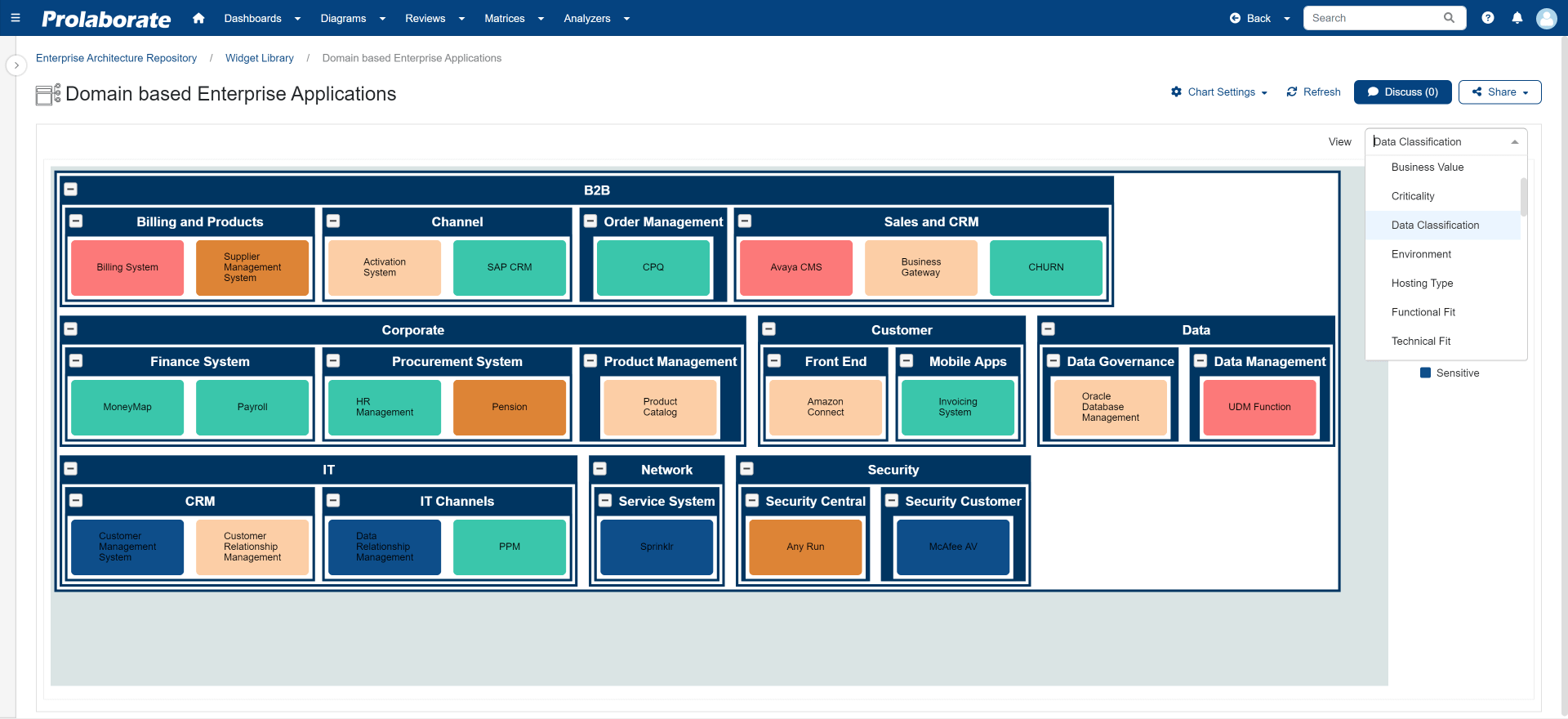
Application Portfolio Management – Accelerator
The Essential Architecture (TEA) is a solution with a comprehensive accelerator package that enables users to embark on their journey. Seamlessly dive into managing your application landscape using the APM Toolkit built based on industry best practices and insights requested by CXOs worldwide.
With the help of the TEA Accelerator pack, architects can quickly begin modelling the data and present a comprehensive analysis of application management to stakeholders.
The accelerator package involves the following:
- Well standardised Metamodel
- Customised MDG Profiles
- Model Patterns
- Excel Spreadsheet
- Import Profiles
- Harvested Model
- Model Add-in (XML file)
- Prolaborate_APMDashboard
Get started easily
With the included APM Accelerator, you can get straight to work without any delays.
Pre-configured dashboards, pre-defined attributes and the Excel integration deliver results that are ready to use straight away and significantly reduce the implementation effort. This saves time, lowers project costs and ensures a quick return on investment.
Metamodel
The APM Metamodel is an open invitation to all architects – whether you are just starting out on your career or are already an experienced professional. We are convinced that, together, we can shape the world of enterprise architecture for the better.
This metamodel is an integral part of the ‘Application Portfolio Management Accelerator’ package. The package enhances Prolaborate’s functionality with valuable features such as model patterns, key architectural artefacts, reports, diagrams and much more. It provides users with the tools to make informed decisions and effectively optimise their application portfolio.
Application portfolio management is carried out via the metamodel view, which focuses on applications with the required attributes and relationships.
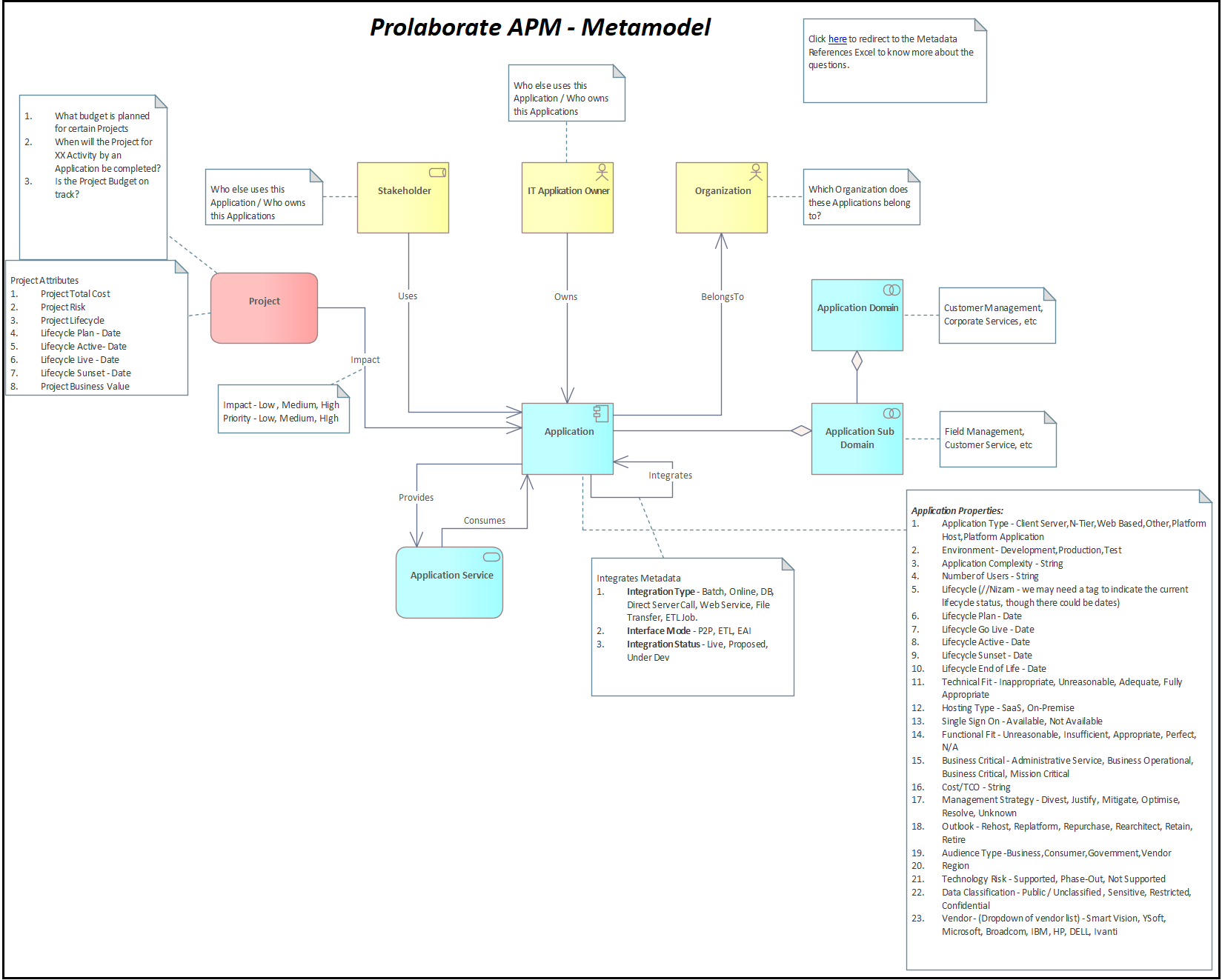
MDG Profiles – a bespoke toolset
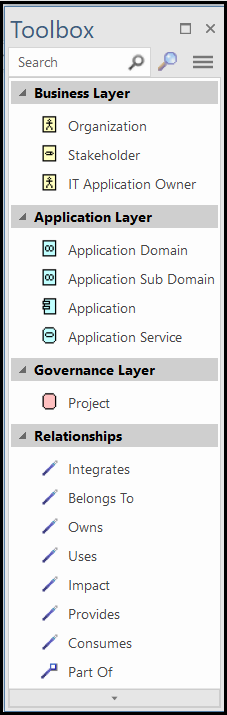
For Application Portfolio Management, Sparx Systems has developed a specialised toolkit (MDG Profiles) that provides model governance and constraints based on the metamodel, tailored to the characteristics and relationships of the applications.
MDG-Profile enables users to create models with clear relationships and a defined structure in accordance with the metamodel. By activating the APM profile in the model, users gain access to a bespoke toolset and predefined patterns.
The customised toolset helps users to easily create elements and their relationships as available in the metamodel. This enables users to quickly design an APM model with the required relationships in accordance with the metamodel.
Model Patterns
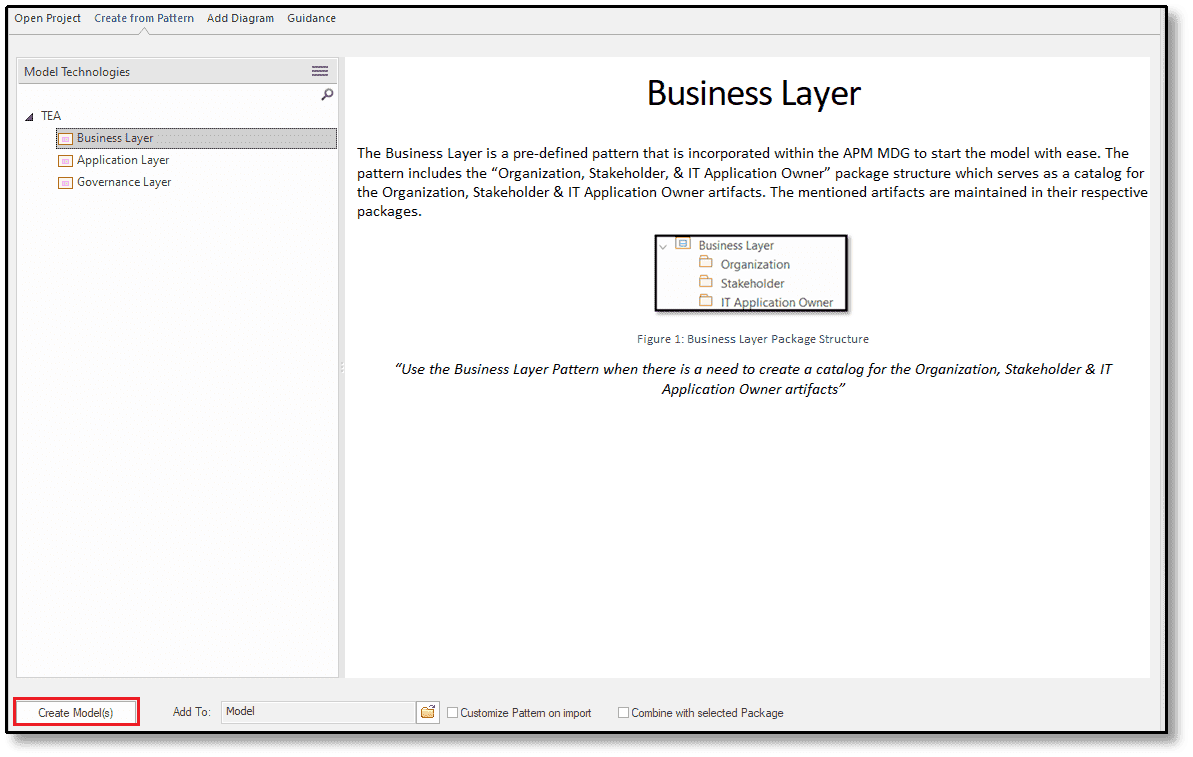
The pre-defined model patterns allow the users to easily begin modelling the package structure which aligns with Application Portfolio Management. Pre-defined patterns are incorporated within the MDG Profile. Users can choose from three alternative sets of patterns while building models.
The pre-defined templates are listed below:
- Business Layer
- Application Layer
- Governance Layer
ENTERPRISE ARCHITECT TRERADO Application Portfolio Management Solution
Transform your Enterprise Application landscape through Enterprise Architect Trerado’s Application Portfolio Management solution, providing comprehensive insights into stakeholder roles, costs, risks, and lifecycle data for strategic planning and cost optimisation.
Benefits of Enterprise Architect Trerado APM
Empower your business with Enterprise Architect Trerado APM to optimise your application portfolio, drive digital transformation and achieve business success.
- Centralised application management
- Make informed decisions
- Strategic planning
- Enhanced collaboration
Videos on the topic of APM: